
7 Best Exercises to Fix Tech Neck
Introduction
Extended screen time and poor ergonomic practices are the main causes of the current posture problem, sometimes referred to as “tech neck.” Whether you’re slouching at your desk, hunching over a laptop, or craning toward a smartphone, the repetitive forward-head position places excessive strain on the cervical spine and surrounding muscles.
This eventually results in rounded shoulders, headaches, stiffness, neck pain, and even noticeable postural alterations like a neck hump. Thankfully, tech neck can be reversed. Without the need for specialised equipment, you may cure pain and regain good posture at home with focused exercises that stretch tense muscles, strengthen deep neck flexors, and realign the spine.
Indications
- Dysfunctional Posture: Prolonged screen time leading to forward head position; • Poor workplace ergonomics causing rounded shoulders and thoracic kyphosis.
- A noticeable cervical protrusion or neck hump: Pain in the Musculoskeletal System
- Tension headaches are associated with suboccipital muscular tension: persistent neck pain or stiffness, particularly in the upper cervical and trapezius regions, and discomfort or tightness in the shoulders due to scapular instability.
- Technology-related overpressure: A lack of ergonomic support or poor workstation posture; prolonged use of computers, cellphones, tablets, or gaming sets; and sedentary behaviour with little breaks for movement.
- Weakness and Unbalanced Muscles: Tight pectorals, SCM, and levator scapulae; weak deep cervical flexors and overstretched posterior neck muscles; decreased thoracic mobility and scapular control.
- Limitations in Function: Inability to stay upright while doing everyday duties; • Pain or limited cervical range of motion when turning the head.
- Chest collapse resulting in compromised breathing mechanics: Wellness and Preventive Objectives.
- Supporting workplace wellness initiatives and ergonomic education to stop the development of disc degeneration, nerve impingement, or chronic pain: Improving posture control and body awareness in tech-heavy settings.
Tech Neck Symptoms
If left untreated, tech neck can soon worsen from its common beginning of modest discomfort. Typical signs and symptoms include:
- Shoulder and neck stiffness and pain.
- Persistent headaches are frequently caused by stress.
- Weakness or weariness of the muscles in the neck and upper back.
- Decreased range of motion, which makes head rotation more difficult.
- Tingling or numbness in the hands and arms (in extreme situations).
- Chronic pain, postural abnormalities, and even long-term spinal misalignment can result from Untreated text neck over time. It’s time to take action to stop additional strain on your neck and shoulders if you frequently experience the symptoms of tech neck.
Exercises For Tech Neck
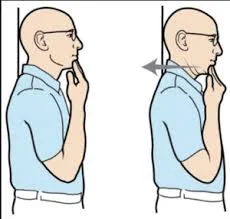
Chin Tuck
- Position: Sitting or standing position.
- With your ears directly above your shoulders, sit up straight and gaze straight ahead. Touch the chin with a finger.
- Pull the head and chin straight back without moving the finger until the top of the neck and the base of the head feel well stretched. (The chin and finger ought to be somewhat separated at this point.) Once more, bring the chin forward to the finger.
- Hold duration is five to ten seconds.
- Repetition should be ten per session.
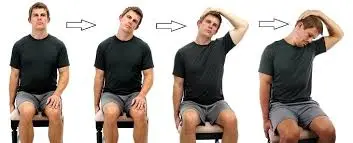
Upper Trapezius Stretch
- Position: Sitting position or standing position.
- Move your right ear toward your right shoulder slowly and comfortably. As you do this, your left shoulder will naturally elevate. In that case, slowly bring your head back toward the centre until you are able to lower your left shoulder again.
- Place your right hand on your left cheekbone and raise it over your head. But don’t pull on your head just yet. Just place your hand there to apply a little extra pressure. This extends your upper trapezius very gently. Sit here for at least 30 seconds and take a breath.
- Release this side gently, then ease your left ear toward your left shoulder. Breathe deeply through the other side as you finish the stretch.
- Repetition should be ten per session.
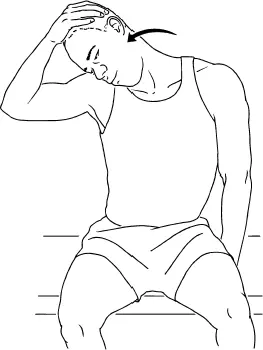
Levator Scapulae Stretch
- Position: Sitting Position.
- With both hands by your sides, sit up straight. With the right hand gripping the right shoulder blade and applying downward pressure, extend the right arm forward and reach across the back. Before the levator scapulae muscle is stretched, this step helps extend it even further by rotating the shoulder blade downward. You can skip this step if you find that elevating the elbow over the shoulder is too difficult.
- Rotate the head 45 degrees to the left (approximately halfway toward the shoulder) while holding everything else stationary. Lower the chin until the back right side of the neck feels well stretched.
- The left hand can be raised to the back of the head and gently pulled down a bit more to extend the stretch even farther.
- Hold duration is five to ten seconds. Repetition should be ten per session.
Shoulder Blade Squeeze
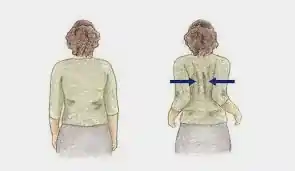
- Position: Sitting or standing position.
- Start by keeping your shoulder and elbow at chest height. The palm needs to be straight. After performing shoulder movements, stretch your entire upper back.
- Hold duration is five to ten seconds.
- Repetition should be ten per session.
Wall Angles
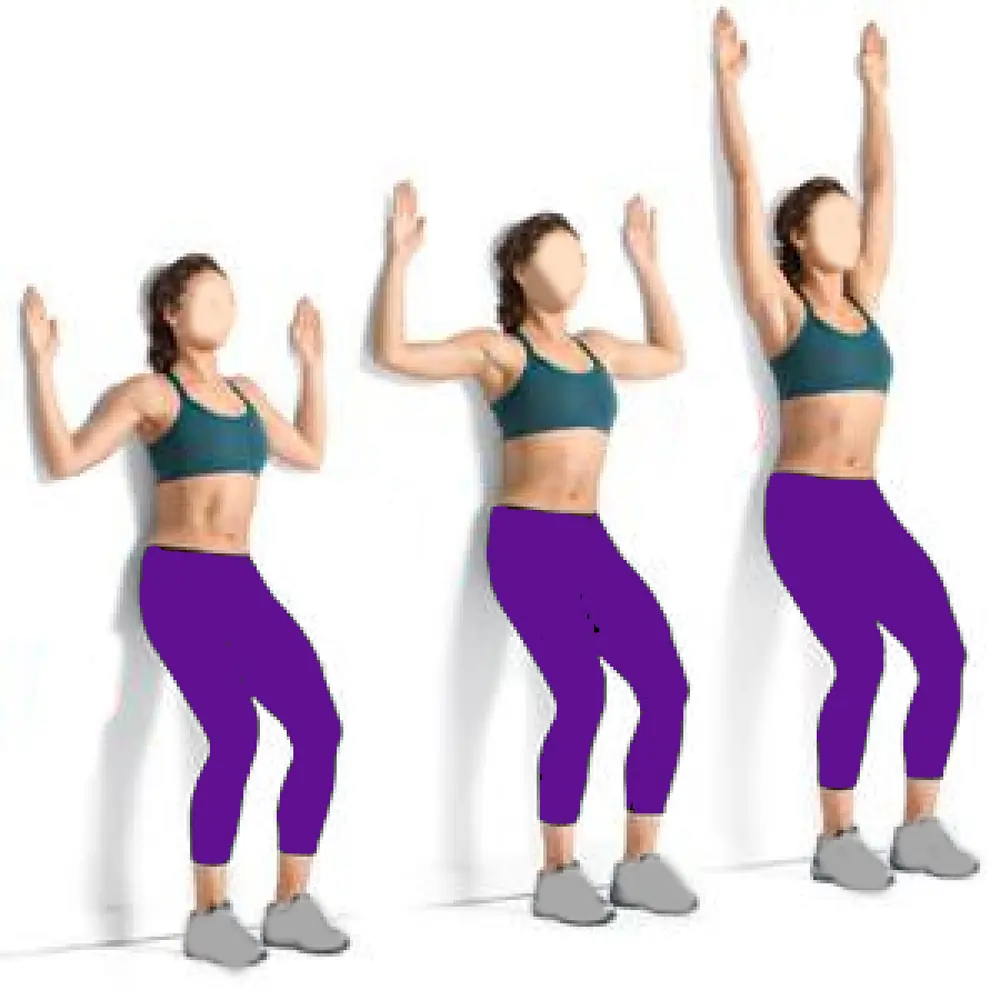
- Position: Standing Position.
- With your feet comfortably spaced from the wall and your back against it, take a tall stance.
- Hold your hands at head height and place the backs of your arms and hands against the wall.
- Reach out toward the ceiling with your arms. Avoid shrugging your shoulders and try to keep your arms on the wall. Lower your arms to the beginning position by sliding them down.
- Hold duration is five to ten seconds. Repetition should be ten per session.
Neck Rotation

- Position: Standing or standing position.
- Start by looking forward and keeping your head straight.
- Start rolling your head back while gently tilting it to the right.
- Continue to roll your head down and then left.
- Keep your shoulders loose and your motions large, slow, and smooth. Take a deep breath and slowly lengthen your neck without letting it drop too far back. You can begin with a semicircular movement if your neck is too weak or if you experience any discomfort.
- Roll your head to the left, then back to the front, then around to the right shoulder, dropping your chin toward your chest.
- Hold duration is five to ten seconds. Repetition should be ten per session.
Thread and Needle Stretch
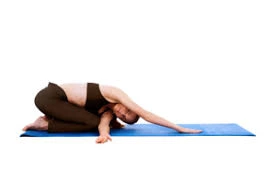
- Position: Tabletop position.
- Your knees should be beneath your hips, and your hands should be directly beneath your shoulders or a few inches in front of them.
- Breathe in and rotate your chest open to the right while reaching your right hand toward the ceiling. Aim to maintain a square hip position.
- With your right palm facing up, exhale and place your right hand behind your left armpit, between your left arm and left leg. Rotate your chest to the left while slowly lowering your right shoulder and the side of your head to the floor.
- To increase the stretch and put more weight on your right shoulder, keep your left hand firmly planted on the floor for support, or move it away from your body and onto your fingertips (as demonstrated above).
- Push onto your left hand to raise your right shoulder off the ground to exit the stretch. Rotate your chest open to the right and reach your right hand toward the ceiling in reverse. Repeat the motion on the opposite side after you’ve returned to tabletop posture.
- Hold duration is five to ten seconds. Repetition should be ten per session.
Advice for Treating Tech Neck
- Maintain Eye Level on Your Screen: Changing the height of your screen is one of the simplest strategies to avoid tech neck. Maintaining your screen at eye level minimises the need to stoop your neck when using a computer, tablet, or smartphone. To raise your laptop, place books below it or use a monitor stand. Hold your phone higher when using it instead of staring down all the time. By making this easy adjustment, you can maintain a more natural position for your spine.
- Keep Your Spine in a Neutral Position: One important factor in avoiding screen neck is your posture. Try to maintain your ears in line with your shoulders, your chin slightly tucked in, and your shoulders back. Your neck and spine will be under more stress if you slouch forward or circle your upper back. Maintaining a neutral posture and lessening the strain on your cervical vertebrae can be achieved by sitting back and using your core muscles.
- Take Regular Breaks to Reduce Stress: Long-term sitting or staring down at a screen causes neck strain and muscle tightness. Take breaks every 30 to 60 minutes to combat this. To correct your posture, get up, stretch your shoulders and neck, or go for a quick stroll. Using a standing desk or setting reminders on your phone can promote mobility and avoid chronic strain. The symptoms of tech neck can be significantly lessened by taking even brief breaks throughout the day.
- Enhance Your Upper Back and Neck Strength: Poor posture and discomfort from tech neck are caused by weak neck and upper back muscles. By strengthening these muscles, you can lessen strain and enhance the support of your spine. Easy exercises that help balance your head and spine include chin tucks, which involve gently pulling your chin back to produce a “double chin.” The forward hunch caused by extended screen time can be avoided with shoulder blade squeezes, which include drawing your shoulder blades together and holding them there for a short while. By including these exercises in your routine, you can avoid chronic discomfort, lessen stiffness, and enhance posture.
- Make Use of a Supportive Work Chair: You may avoid tech neck and maintain a natural sitting posture with the aid of an ergonomic office chair that provides enough neck and lumbar support. Choose a chair that lets you sit with your feet flat on the floor and accommodates your spine’s natural curvature. Additionally, adjustable armrests and headrests can assist you in maintaining proper posture and lessen the needless pressure on your neck all day long. Purchasing the appropriate chair may have a big impact on improving posture and lowering pain.
- Keep Your Phone Eye Level: Constantly staring at your phone is one of the main causes of tech neck. To maintain the alignment of your spine, hold your phone at eye level rather than cocking your head forward. Use a phone stand or place your device on a sturdy surface if you plan to read or watch something for a long time. By making this minor change in your phone usage habits, you can lessen neck strain and treat your spine without undergoing surgery.
- Perform neck stretches and chin tucks: The muscles that support your spine can be strengthened, tension can be released, and flexibility can be increased with daily neck stretches and exercises. A simple yet powerful exercise is the chin tuck, which involves gently pulling your chin back to bring your head into line with your spine, holding it for a few seconds, and then letting go. Shoulder exercises can counteract the forward slouch caused by extended screen time, while neck rolls help relax tense muscles. You can maintain your neck flexible and pain-free by incorporating these motions into your everyday routine and avoiding stiffness.
- Switch to a Standing Desk Periodically: You may considerably lessen the tension on your neck and back by switching between sitting and standing throughout the day. By maintaining your screen at eye level and avoiding extended strain on your cervical spine, a standing desk helps you regulate your posture. To reset your posture and lessen stiffness, try taking standing breaks every 30 to 60 minutes if you can’t use a standing workstation.
- Modify the Position of Your Mouse and Keyboard: Maintaining proper posture is greatly influenced by where you set your keyboard and mouse. To avoid needless shoulder and neck strain, place them so that your arms rest comfortably at a 90-degree angle. Keeping your elbows close to your body eases tension on your upper back, and a wrist rest can assist you in keeping your hands in alignment. A well-designed workstation can significantly reduce the risk of developing neck pain.
- Use Ice or Heat to Provide Relief: Heat and cold therapy can be helpful if you have significant neck pain or stiffness. While an ice pack can lessen inflammation and numb discomfort, a heating pad can relax tense muscles and improve blood flow. Try using ice for the first 48 to 72 hours to reduce swelling, and then use heat therapy to relax the muscles for the best effects. It can be quite beneficial to switch between heat and cold therapy, particularly after spending a lot of time at a desk.
- If necessary, get professional tech neck treatment: It could be time to get expert assistance if screen neck ache worsens or becomes chronic. Targeted treatments from a massage therapist, physical therapist, or chiropractor can help reduce stress, enhance posture, and build stronger supporting muscles. Specialised exercises, manual treatment, and posture retraining can provide long-term comfort and stop further tension. Speaking with a Northeast Spine and Sports Medicine specialist guarantees that you will receive individualised advice on how to maintain a pain-free and healthy neck.
Benefits
- Reduction of Tension and Pain: Relieves headaches, stiffness, and chronic neck discomfort caused by forward head position. It also eases tension in the muscles of the suboccipital area, levator scapulae, and upper traps.
- Enhancement of Postural Alignment: By strengthening the deep neck flexors, the cervical spine may return to its neutral posture. It also improves general spinal mechanics by addressing forward head tilt and rounded shoulders.
- Strength and Muscle Balance: Improves thoracic mobility and scapular stability for upright posture; rebalances tight and weak muscle groups (e.g., extends pectorals, strengthens deep cervical flexors).
- Avoiding Prolonged position: helps avoid nerve impingement, disc degeneration, and postural abnormalities such as Dowager’s hump. Lowers the chance of long-term musculoskeletal disorders caused by excessive screen time
- Support for Functional Ergonomics: promotes improved head and shoulder posture when using technology, which lessens strain whether working or playing games. Enhances ergonomic treatments such as chair support and monitor height adjustment.
- Increased Flexibility and Mobility: Promotes improved breathing mechanics by opening up the chest and decreasing slouching; • Increases cervical and thoracic range of motion, making everyday motions more fluid and less uncomfortable.
- Increased Self-Belief and Appearance: Maintaining an upright posture reduces obvious symptoms of tech neck, such as sagging shoulders and neck hump, and enhances one’s confidence and vitality.
Home Remedies
- Heat and ice Therapy: In order to increase circulation and relax tense muscles, use hot compresses or ice packs for 48 to 72 hours after applying cold and heat therapy. Ice packs also decrease inflammation and numb acute neck and upper back discomfort.
- Set up for Ergonomic Sleep: Use ergonomic or orthopaedic pillows to promote neck alignment; in clinical research, spring or rubber pillows perform better than feather ones. Avoid sleeping on your stomach since this puts tension on your neck.
- Gentle Stretching and Mobility Drills: To relieve stress and correct posture, do neck rotations, chin tucks, and upper trap stretches. These exercises increase flexibility and lessen stiffness without putting undue strain on the spine.
- Posture Correction and Movement Breaks: Maintain a neutral spine posture by placing your ears over your shoulders, tucking your chin in, and keeping your shoulders relaxed. To avoid stiffness, take brief walks, shoulder rolls, or neck circles to realign your posture.
- Screen Positioning: Use phone stands or raise laptops with books to maintain an upright posture; keep displays at eye level to prevent neck strain and downward gazing.
- Strengthening activities that create muscle support include thoracic extensions, deep neck flexor activation, and scapular squeezes. These exercises also increase endurance for tech-heavy work and prevent future injury.
FAQs
How can a stiff neck be released?
Using mild heat is one of the finest methods for relaxing tense neck muscles. A heating pad can be placed on your neck after being wrapped in a towel. To relax tense neck muscles, you can also stand under a warm shower for a few minutes.
Can stiff necks result from dehydration?
Neck pain and stiffness are frequently caused by dehydration. Neck stiffness may result from the dehydrated body’s stiffer muscles, ligaments, and tendons. This tightness can occasionally hurt and make it harder to move your neck.
What is the reason for neck tightness?
Common causes of neck tightness include stress and tension, as well as muscle strain from bad posture, sleeping in an uncomfortable position, or overuse. Herniated discs, pinched nerves, degenerative diseases like arthritis, and injuries like whiplash are additional causes. Rarely, tightness in the neck may indicate a serious infection, such as meningitis.
Can a stiff neck result from low iron?
Conclusions: Iron and vitamin D insufficiency should be regarded as two modifiable risk factors for persistent neck discomfort, even though they cannot be identified as the only risk factors. It is concerning because women are more likely to have low ferritin, hypovitaminosis D, and chronic neck pain.
Which kind of treatment works best for tech neck?
Medication and physical therapy, steroid and trigger point injections, nerve blocks, and minimally invasive procedures like radiofrequency ablation are examples of nonsurgical therapies. Our skilled surgeons provide the most cutting-edge methods if surgery is the best way to reduce your pain and regain function.
Is It Possible to Reverse Tech Neck?
Indeed! With the right care, posture adjustments, and muscle building, tech neck can be reversed. Over time, symptoms can be reduced by implementing daily neck stretches, modifying the ergonomics of your desk, and applying heat or ice therapy. Physical treatment, massage therapy, and chiropractic adjustments can also hasten the healing process. Long-term behaviour adjustments, such as sitting with a neutral spine, limiting lengthy screen time, and strengthening supporting muscles, are necessary for long-lasting improvement.
How Can Tech Neck Be Prevented in the First Place?
The greatest strategy for preventing tech neck is to adopt preventive behaviours. Whether using a phone or a computer monitor, keep your screen at eye level to maintain proper posture. Every 30 to 60 minutes, take a little break to stretch and walk around. Organise your workspace with an ergonomic chair that supports your neck and lumbar region. Use exercises like shoulder blade squeezes and chin tucks to strengthen your upper back and neck. You’re less likely to experience severe neck pain if you start making these adjustments early.
References
- Meyler, Z., DO. (2018, September 10). Easy chin tucks for neck pain. Spine-health. https://www.spine-health.com/wellness/exercise/easy-chin-tucks-neck-pain
- Stelter, G. (2018, September 29). Stretches to loosen your trapezius muscles. Healthline. https://www.healthline.com/health/fitness-exercise/trapezius-stretches#ear-to-shoulder
- Meyler, Z., DO. (2018b, September 10). Easy Levator scapulae stretch for neck pain. Spine-health. https://www.spine-health.com/wellness/exercise/easy-levator-scapulae-stretch-neck-pain
- https://www.saintlukeskc.org/health-library/shoulder-squeeze-exercise
- Wall Angels. (n.d.). [Video]. Hingehealth. https://en-gb.hingehealth.com/resources/articles/how-to-do-wall-angels/
- Bunch, E. (1970, January 1). Melt Away Upper Body Tension with the Thread the Needle Stretch. https://www.onepeloton.com/blog/thread-the-needle-stretch
- Daisy. (2021, June 8). Neck Rolls | Illustrated Exercise Guide. SPOTEBI. https://spotebi.com/exercise-guide/neck-rolls/
- Lambrou, D. (2025, February 21). 11 tips for getting rid of tech neck | Northeast spine and sports Medicine. Northeast Spine and Sports Medicine. https://www.northeastspineandsports.com/blog/11-tips-for-getting-rid-of-tech-neck-northeast-spine-and-sports-medicine/