How To Reduce Back Pain While Working From Home
Introduction
Working from home has become a normal part of life for many people, offering flexibility and convenience. However, spending long hours sitting at a desk or using a laptop on the sofa, bed, or dining table can place excessive stress on the spine and surrounding muscles.
Poor posture, an improper workstation setup, limited movement, and prolonged sitting are some of the most common reasons people experience back pain while working from home. Over time, these habits can lead to muscle stiffness, reduced flexibility, poor circulation, and discomfort in the neck, shoulders, and lower back.
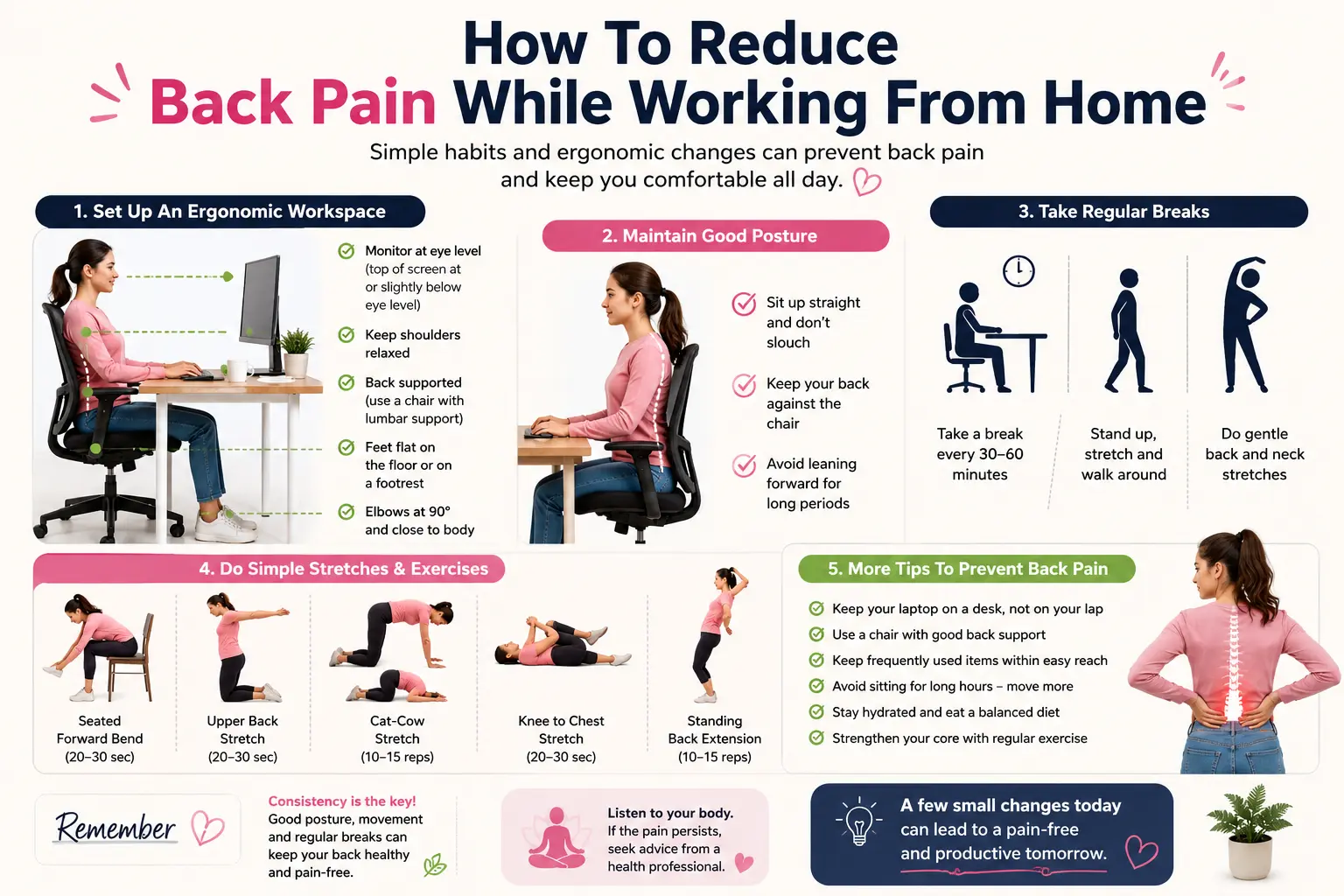
The good news is that most work-related back pain can be prevented or reduced by making a few simple changes to your daily routine. Setting up an ergonomic workstation, sitting with proper posture, taking regular movement breaks, and performing gentle stretching exercises can significantly reduce strain on your back. Even standing up for a few minutes every 30 to 60 minutes helps improve blood circulation, relax tight muscles, and reduce pressure on the spinal discs.
Maintaining a neutral spine while sitting is equally important. Your feet should rest flat on the floor, knees bent at approximately 90 degrees, shoulders relaxed, and your computer screen positioned at eye level. Using a chair with proper lumbar support and keeping frequently used items within easy reach can also improve comfort throughout the workday.
In addition to improving your workstation, regular exercise plays a vital role in maintaining a healthy back. Stretching the hip flexors, hamstrings, chest, and back muscles, along with strengthening the core muscles, helps improve posture and supports the spine. Staying hydrated, managing stress, and getting enough sleep also contribute to better musculoskeletal health and faster recovery from daily strain.
This guide shares practical, physiotherapist-recommended strategies to help reduce back pain while working from home. By following these simple ergonomic tips, posture corrections, and easy daily stretches, you can create a healthier work environment, improve productivity, and keep your back strong and pain-free.
Small lifestyle changes practiced consistently can make a significant difference in preventing discomfort and supporting long-term spinal health, allowing you to work more comfortably and efficiently every day.
Why Back Pain Happens When Working from Home
When working remotely, back pain typically results from several factors:
Bad posture: The spine is strained when sitting on the couch, bed, or dining chairs without lumbar support.
Extended sitting: Spending hours in one spot strains muscles and joints and lowers blood flow.
Uncomfortable desk arrangements include seats with insufficient support, keyboards that need awkward arm postures, and monitors that are either too high or too low.
Lack of movement: While working from home can keep you seated all day, office settings frequently encourage short breaks, such as strolling to a conference room or conversing with a coworker.
How To Reduce Back Pain
Benefits of working from home include a flexible dress code and no commute. You can select to keep your workspace cool or warm while petting the dog.
However, there are drawbacks as well: You may get neck and back pain if you work while hunched over on the couch rather than on an ergonomic chair at a desk. Your home workstation may not be the best for your health for several reasons, including:
- Your chair’s kind, firmness, and lumbar support
- Your chair’s height in respect to your desk
- The location of the monitors
- How frequently do you take breaks from sitting?
- When working from home, these and other variables might cause neck and back pain.
Give your back a break: Keep moving
Consider a Standing Desk
One of the main causes of back and neck pain is working in a single position without breaks, even in an ergonomic office. Those who are no longer in the cubicle are most affected by this issue.
Even if it’s merely to stretch and move out of the head-forward position that many individuals are in while working on documents and sitting through Zoom meetings, try to get up every 30 minutes.
A small walk in the yard or a trip to the kitchen for a refill of coffee or water might be beneficial, even if it interrupts your flow of thinking.
Choosing a Standing Desk
The standing desk is a great compromise because therapists frequently encourage patients to switch positions while working every 30 to 60 minutes. However, this can be challenging in professional contexts where people tend not to want to break from their level of interest in a particular activity.
Using Your Standing Desk
Think about your unique requirements, including your budget and available space, both of which are crucial. If you’re not sold on a standing desk, you might want to think about a semi-permanent standing desk converter that complements your current workstation.
Additional factors to take into account when selecting a standing desk option:
Ease of installation. Read customer reviews because things aren’t always as straightforward as they look.
Height. What is the required “tall”? Check the range of any standing desk accessory to make sure it meets your demands because not all of them have height adjustments.
Manual versus electric.
Accessories and flexibility. Consider whether you value features like mobility, extra shelves, or left/right orientation.
Invest in an Ergonomic Chair
While a bed, armchair, or sofa are excellent place to unwind, they might not be the best places to spend hours bent over a computer. You can better position yourself for your workday by setting up a desk or table in your workstation. Purchasing a decent chair will help you maintain proper posture and prevent a sore back during the time you spend in front of the screen.
Instead of just moving up and down, you want adjustable armrests that can move forward and back. To avoid reaching when seated in a chair, you should keep your elbows at a 90-degree angle.
Support for the lumbar back is crucial. The chair should be high enough for your feet to rest on the floor and should have a lower back adjustment. Putting something under your feet can help if your legs aren’t touching the ground.
Think beyond the back.
Your vision may be the first sign of back and neck strain.
One of the appointments you may have had to postpone or reschedule because of the COVID outbreak is an eye exam. However, using computers and smaller screens at home results in squinting and straining, which strains the neck and back while you try to see. One easy first step is to make the writing on your screens larger.
Your neck and back are supported by your core muscles. When you spend a lot of time in one position, your muscles shut off. A physical therapist can help you re-engage those muscles. You can stabilize your spine and avoid strain by strengthening your gluteal and deep abdominal muscles.
Feet. Comfortable, supportive shoes are crucial for people who work at a standing desk because walking and standing strain the entire spine.
Head. A restful night’s sleep is the first step toward a more comfortable workweek at home. An uncomfortable day of working from home can be caused by a pillow that is too high or too low, which can strain your neck when you sleep and cause stiffness in your shoulders and neck.
Any pillow that helps you sleep deeply and wake up rejuvenated and pain-free is the appropriate one for you, despite the fact that pillows have grown extremely specialized (with price tags to match).
Mindful Practices to Address Back and Neck Pain
It matters a great deal how we interpret the suffering we are going through. Stress reduces our capacity to manage our aches and pains; even seemingly insignificant issues can become really challenging. Instead of focusing on all the wonderful things we can do, we often focus on the negative aspects of our physical suffering.
You can lessen your focus on aches and pains by closing your eyes and visualizing a peaceful location, like your favorite spot on the beach.
Another method to help you feel more at ease and focused is pursed-lip breathing. Inhale slowly through your nose, then gently exhale through your mouth as you’re blowing out a candle. Pain-related thoughts can be de-escalated and even lessened with a few repetitions.
Red flag for back pain
Low back pain usually needs immediate medical attention if you experience any of the following 5 critical red flags:
- Loss of bowel or bladder control.
- Progressive weakness in the legs.
- Unexplained weight loss.
- Fever or chills accompanying the pain.
- Pain following a traumatic accident or in individuals with a cancer history.
These warning signs can indicate serious underlying conditions such as spinal infections, tumors, or severe nerve compression.
Critical Red Flag Symptoms
Severe, worsening numbness, tingling, or weakness in the legs (e.g., foot drop) can suggest serious nerve root compression. Progressive Neurological Deficits:
Fever or Chills: Fever with back pain could be a sign of a spinal infection, especially if you have a weakened immune system or have recently used intravenous drugs.
Unexplained Weight Loss: Significant, unintentional weight loss may indicate a serious systemic illness such as malignancy.
Back Pain After Trauma or Cancer History: Back pain following a physical injury (such as a fall or car accident) or in a person with a history of cancer should be evaluated promptly to rule out spinal fractures or metastasis.
Best Position
The best lower back pain positions support the natural curve of your spine and reduce muscle strain. You can lie on your side with a pillow between your knees or on your back with a pillow under your knees. When sitting, use a lumbar cushion and keep both feet flat on the floor.
The best position depends on what you’re doing and where you feel the most pain:
1. Sleep
Side Sleepers: Put a firm pillow between your legs to align your hips and prevent your spine from twisting.
If you sleep on your back: Put a pillow under your knees to relieve lower back pressure.
Stomach Sleepers: This position is generally discouraged as it arches the spine. If you must, place a flat pillow under your pelvis to decrease extension of the lower back.
2. Sitting
Don’t slouch. Sit up straight.
Place a lumbar support pillow or a rolled-up towel to support the natural inward curve of your lower back.
3. Standing up
Keep your weight evenly distributed between your feet.
Don’t stay in the same spot for long periods of time.
Relieve tension by resting one foot on a low stool or box and then switching feet every 5 to 10 minutes.
What are three causes of lower back pain?
Three common reasons are:
1. Strain of the Muscle or Ligament
It often happens when you lift something too heavy, make sudden movements, or use poor body mechanics, stretching or tearing the fibers of the back muscles or the ligaments that support the spine.
2. Herniated or bulging disc
Your discs are the cushions between your vertebrae. If one of these discs becomes badly worn or traumatized, the soft inner part can bulge out (herniate) and press directly on nearby spinal nerves, producing sharp pain or sciatica.
3. Spinal Arthritis
Osteoarthritis and facet joint syndrome are major inflammatory joint diseases that cause chronic low back pain. This occurs when the cartilage cushioning and protecting the small joints in your spine breaks down, causing inflammation, stiffness,s and pain.
What are the signs of a weak lower back?
A weak lower back may cause a dull ache in the lumbar area, stiffness in one spot, postural changes (such as a tendency to lean forward), and a sensation that your spine may “give out.” It often results in core instability, making it hard to do basic bending or sitting. It can cause radiating pain, numbness,s or “pins and needles” down your legs.
Weak Lower Back Symptoms
Postural Fatigue: Inability to maintain an erect posture, with the need to slump constantly after sitting or standing.
Less Stamina: The lower back muscles get tired easily, ly and this leads to dull pain that gets worse as the day goes on.
Radiating Pain: Pain radiating down into the glutes or thighs.
When to Seek Immediate Medical Care
Rest often helps with mild symptoms, but you should seek urgent medical attention if back weakness is accompanied by any of these red flag symptoms:
Sudden unexplained weakness of the foot or leg.
Saddle anesthesia (numbness in the groin/glute area).
Loss of bowel or bladder control.
FAQs
What are the ways to avoid back pain?
Make it a habit to get up and move around the home every time you get a call, or take a five-minute break to do so. Stretch: Tight muscles may be the source of low back discomfort. Stretching at home is a simple solution. One effective strategy to prevent muscle tension is to stretch throughout the day.
How to avoid lower back injury?
Sit up straight and stand.
Avoid hard lifting. When lifting something big, keep your back straight and bend your knees.
Strive for a healthy weight. Your back may be strained if you are overweight.
How to overcome back pain?
The foundation of treating persistent back pain is typically exercise-based physical therapy. Changing one’s lifestyle to maintain a healthy weight, keep active, and improve posture can help lessen the symptoms of persistent back pain. Surgery is sometimes required, although it does not ensure total pain relief.
Should I keep working if my back hurts?
If you have mild or moderate back pain, it’s generally ok to go to work, as rest can actually make it worse. But if you have “red flag” symptoms such as shooting leg pain, numbness or weakness, sudden instability, or loss of bladder/bowel control, you should stay home and get medical care.
If you can handle the pain, here are some things you can do to make your work day safer:
Edit your tasks: Don’t lift heavy objects. Don’t bend or twist at the waist. If you have a physical job, talk to your employer about light-duty options.
Adjust your posture: Ensure your feet are flat on the floor, your knees are just below your hips, and a cushion or lumbar chair supports your lower back.
Take active breaks: Every 30 to 40 minutes, set a timer to get up, stretch, and go for a walk.
How long does back pain last?
Back pain usually lasts from a few days to a few weeks, and 70 to 95 percent of acute cases resolve within six months. Health care providers classify the duration of back pain into one of three separate categories:
Acute: < 4 weeks (duration). This is the most common type, usually caused by muscle strain and usually improves on its own with self-care.
Subacute: Lasts 4 to 12 weeks.
Chronic: lasts longer than 12 weeks (3 months)
Most minor back sprains improve greatly within 2 to 4 weeks. But pain that persists longer than a few weeks usually requires a more formal rehabilitation program.
References
- Admin. (2026a, March 24). Recover stronger: 5 Common football injuries and care. Soundarapandian Bone and Joint Hospital. https://www.boneandjointindia.com/work-from-home-ergonomics-expert-tips-to-prevent-back-neck-and-shoulder-pain/
- Admin. (2026b, April 28). Work from home back pain: physiotherapy solutions that actually work. Healthspace Clinic. https://healthspaceclinic.com/work-from-home-back-pain-physiotherapy-solutions/
- Prevent back pain at work: 10 tips for 2026. (n.d.). https://camelbackspine.com/blog/10-expert-tips-to-prevent-back-pain-at-work-for-2026
- Preventing back pain while working from home. (2026, June 16). Gleneagles Hospitals. https://www.gleneagleshospitals.co.in/blogs/neuro-spine-surgery/preventing-back-pain-while-working-from-home
- U of U Health Authors & Marketing and Communication. (2026, January 20). Five tips for reducing back and neck pain at work and home. University of Utah Health | University of Utah Health. https://healthcare.utah.edu/healthfeed/2026/01/five-tips-reducing-back-and-neck-pain-work-and-home